About You

IP Address: 38.107.179.231
Our service replaces your IP Address with one of our secure and anonymous IPs. It will make you appear to be from the USA, UK, Canada, Germany etc.
The most trusted industry leader. Servicing businesses, professionals and home users.
Become Anonymous, Stop Government/ISP Monitoring and Tracking, Unblock VOIP, Skype, and all other content/websites, Secure Your Connection
  • 30+ PPTP/OpenVPN Locations, one low price.
  • Instant Setup 24/7.
  • Cloud VPN Servers.
  • 1000mbit/1gbit superfast servers.
  • PPTP & OpenVPN Accounts.
  • Off-Shore Servers included.

  • OpenVPN Client Setup/Configuration Windows


    1.) First install OpenVPN by downloading from here: http://openvpn.net/release/openvpn-2.1.1-install.exe

    2.) After installation is complete - find OpenVPN in the Start Menu and find it (click on "OpenVPN configuration file directory")

    *Sometimes the "OpenVPN configuration file directory" is found in a folder called "shortcuts" instead.
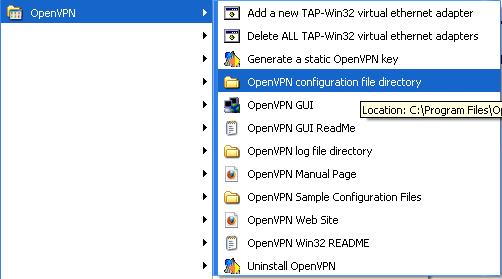
    OpenVPN Client Configuration/Install


    3.) Save/copy/move the config.zip file provided to you already and extract it into the "OpenVPN configuration file directory".
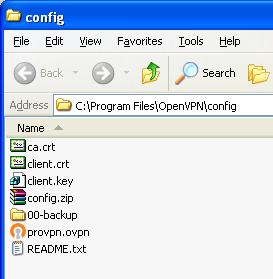

    OpenVPN Config Directory & Files


    4.) Find the OpenVPN program in the Taskbar/System Tray on the bottom right:


    OpenVPN Tray Icon

    5.) Double click it/choose your location, and you will be prompted for your username and password, then the VPN will connect.


    Do You Have Questions?

    Our professional support staff will be glad to answer your questions/concerns.

    Click Here To Contact Us (fast response).

    Examples of VPN Benefits